Read the excellent reviews!

Pedi QuikCalc app is true to its name, a quick and easy medical calculator for pediatricians
Sep 28, 2012 by Brittany Chan

Compatibility: iPhone, iPad, iPod Touch. Optimized for iPad. Available on the Apple App Store.
Requires: iOS 5.0 or later
Purpose of App Review
To explore the features of Pedi QuikCalc and how this app may be useful to pediatricians, family practitioners, or any physician who takes care of children in their practice.
Introduction
From newborns to adolescents, caring for a pediatric patient is a unique and challenging experience. Pediatricians track their patients’ weights and heights closely to detect any major increases or decreases in growth.
More than in the adult world, the patient’s weight is key to calculation of medication dosages. A patient’s precise age matters, particularly early in life when months, days, or even hours of age can make a difference in assessment and management.
Pedi QuikCalc is a simple app to make all of the above easier. It was created by pediatrician Dr. W. Kent Bonney, and includes features such as an IV fluid calculator, weight-based dosage calculator, BMI-for-age calculator, the ability to plot on CDC or WHO growth charts, and links to helpful resources such as the BiliTool, AAP, and the CDC website.
User Interface
Overall, the app is intuitive and simple to navigate. There are five main tabs listed at the bottom of the screen: Weight, Drugs, IV, Age, and More.
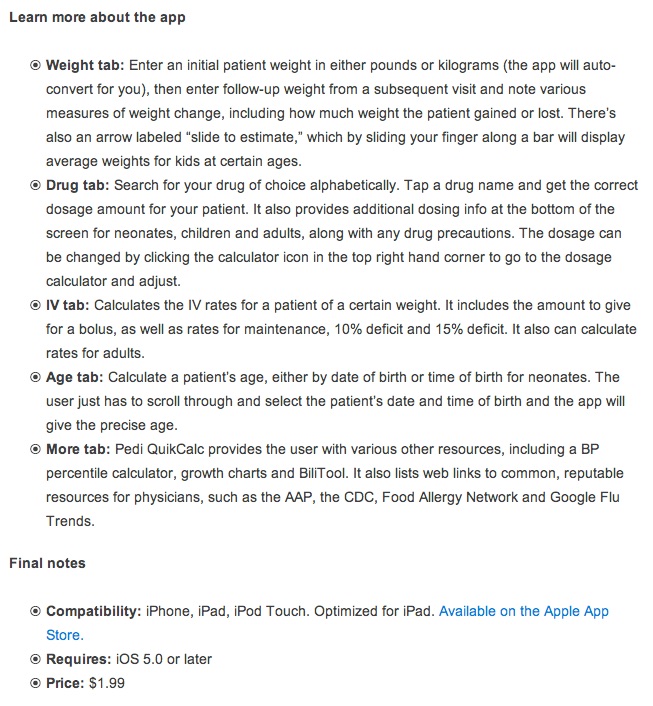
Let’s start with Weight. The Weight tab allows you to enter an initial patient weight in either pounds or kilograms (the app will auto-convert for you), then enter follow-up weight from a subsequent visit and note various measures of weight change, including how much weight the patient gained or loss, and the percent loss.
On the left side, there is an arrow labeled “slide to estimate”. By sliding your finger along this bar, the app will display average weights for kids at certain ages.

To thoroughly explore the features of this app, let’s say I am following a 30-month-old boy. When he initially came in for a well-child check at 24 months, I saw that he weighed 11 kg. At his visit today, he weighs 13 kg. I want to enter his past weight and his current weight to see how much he has gained.
To enter a weight in kg, you have to tap “lbs”, and to enter a weight in lbs you have to tap “kg.” This was a little confusing, but was easy enough to figure out. I enter 11 kg under initial patient weight, and the app automatically tells me that is equivalent to 24 lbs, 4 oz. After entering his follow-up weight from today, 13 kg, I tap calculate:

From here, I can easily see how much he has gained. Under Weight Change, the app tells me he has gained 4 lbs, 6.5 oz, or 2 kg, for an 18.2% increase. This feature would be particularly useful at neonatal checkups to monitor weight loss or gain from birth weight.
The next main tab is Drugs. From this screen you can quickly search for your drug of choice alphabetically. If my 30-month-old patient also had otitis media at this visit and I wanted to give amoxicillin, I could easily find the right dose by tapping its name on the list.

The app means to dose by the weight that was entered in the first section for convenience. Unfortunately, it still uses the initial weight value, not the follow-up weight (today’s weight), which is inappropriate.

I go back to the Weight tab and change the initial weight to 13 kg. Now, it gives me the suggested dose of amoxicillin for a 13 kg child. It also provides additional dosing info at the bottom of the screen for neonates, children, and adults, along with any drug precautions (hepatic, renal, etc.)


If I want to change the strength, formulation, or dose, I can click the calculator icon in the top right hand corner to go to the dosage calculator and adjust for that.

The next section of the app, IV, is simple and self-explanatory. It calculates the IV rates for a patient of a certain weight (in this case the same 13 kg child). It includes the amount to give for a bolus, as well as rates for maintenance, 10% deficit, and 15% deficit. It also can calculate rates for adults.

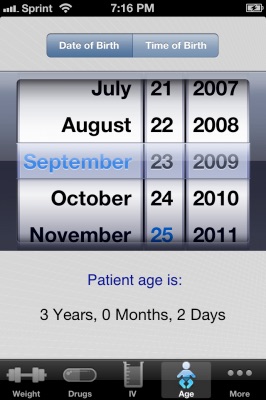
A handy little feature of the app is the ability to calculate a patient’s age, either by date of birth or time of birth for neonates. The user just has to scroll through and select the patient’s birthday, or date and time of birth, and the app will give the precise age.


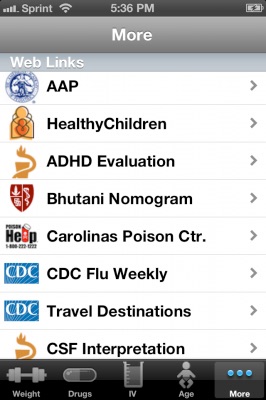
Finally, under the More tab, Pedi QuikCalc provides the user with various other resources, including a BP percentile calculator, growth charts, and BiliTool.
It also lists web links to common, reputable resources for physicians such as the AAP, the CDC, Food Allergy Network, and Google Flu Trends.

Price
-
■ $1.99
Likes
-
■ Friendly user interface
-
■ Makes many tedious calculations in pediatrics easier – weight changes, drug dosing, etc.
-
■ Wide range of functionality useful for pediatric practice
-
■ Links to useful websites and other calculators
-
■ Frequently updated
Dislikes
-
■ App could be improved by allowing weight to be more easily adjusted throughout the app, especially when changing patients. Practitioners must be very careful that they are making calculations using the correct weight.
Healthcare providers that would benefit from the app
-
■ Medical students, especially on their pediatric clerkship
-
■ Interns and residents
-
■ Pediatricians, family practitioners, ER doctors, or any physician that manages children
-
■ Nurses
Conclusions
This app is a must-have for anyone who sees children in their practice. It simplifies many of the mundane calculations that must be done by a physician and is a great medical reference tool. At $1.99, there is no reason not to pick it up!
iMedicalApps recommended?
-
■ Yes
Rating:
Overall: 4.5/5 stars
-
■ User interface: 4/5 stars.
Easy to navigate and intuitive, there are only a couple things that keep this app from getting the full 5 stars. The app could be improved by allowing the user to adjust weights in every tab, such as the drug dosing screen (without having to go to the dosage calculator) and the IV tab, which has absolutely nowhere to change the weight value. The weight tab could also use some improvements itself; I often hit the “slide to estimate” arrow unintentionally and had to re-enter my desired weights
-
■ Multimedia usage: 4/5 stars.
It’s a simple app, but the web and calculator links are fantastic features that especially boost the usefulness of the app.
-
■ Price: 5/5 stars.
Yes, there are free apps out there, but Pedi QuikCalc has a wide range of functionality, fast access to resources outside the app, and a great user interface. At $1.99, this app is well worth the price.
-
■ Real world applicability: 5/5 stars.
Any practitioner who cares for children regularly would find this app helpful.

10 Useful Apps for Everyday Pediatric Use
Lindsay B. Blackmon, MD
-
1Pediatric Annals
-
2May 2012 - Volume 41 · Issue 5: 209-211
-
3
-
4DOI: 10.3928/00904481-20120426-12
-
5

Dr. Blackmon has disclosed no relevant financial relationships.
All apps listed are compatible with the iPhone, iPod Touch, iPad, and Droid systems, unless otherwise noted.

Although part of the Millennial Generation, I am by no means a “techie.” For example, I do not own a smartphone. I do not have accounts on Facebook, Twitter, or Pinterest. I am not a computer whiz kid or computer science savant. But I find my iPad as essential as my vision, and rarely leave home without it. To help the tech-savvy and tech-simple alike, I have compiled a list of 10 useful apps for general pediatricians.
I used certain criteria for inclusion. First, the app must be user friendly. Second, the app must be inexpensive, ie, less than $5 (I am on a resident’s budget, after all!). And third, the app must be of practical value to a general pediatrician’s practice.
1. Google Translate (free). In a busy pediatrics office without access to a translator, this app can be a lifesaver. This app translates English into 57 languages — and back. Speaking into the microphone, you can record your questions or instructions of up to 30 seconds into the voice recognition system. Results are then displayed in text in both English and the other language. This allows you to know immediately whether your device recorded your words exactly. If not, the app has a function that allows you to edit or make any corrections. Then, by pressing your phone’s speaker button, the app will verbalize your translation to the patient. You can also do the process in reverse. Have your patient speak into the microphone, and the app will translate the patient’s words into written and verbal English text.
Although not perfect, using the app for specific medical terms such as “pancreatitis” or “febrile seizure” is probably better than using a 7-year-old sibling as a translator. Of course, having a live adult translator or a translating phone subscription remains the gold standard medico-legally.
Drawbacks: It does a poor job at translating measurements using “teaspoons.” Instead, I found saying “milliliters” worked better. Translating specific antibiotics was also limited, but this easily can be overcome by free texting (ie, typing the word rather than dictating). Also, the audio function is not available for all 57 languages. Obtaining an entire history and physical using the app could take a while, but probably would work better than resorting to your acting skills for things like “vomiting” and “diarrhea.”
2. Epocrates (free). A survey of favorite apps among my fellow pediatric residents and pediatric attendings resulted in an overwhelming majority recommending Epocrates. This app allows you to easily look up any medication regarding dosing, formulas, adverse effects, etc. The app also can evaluate interactions between several drugs. Medications also can be assessed for safety indications in pregnancy and breast-feeding.
Drawbacks: The “monitoring” category was limited for specific guidelines. For example, when searching “risperidone,” Epocrates lists several laboratory evaluations to follow, without the specific timing and frequency.
3. Pedi QuikCalc (free). This app is perfect for those who prefer a less-detailed version of Epocrates, but who desire calculations done instantly. Several features are quite helpful. First, by entering the child’s weight and selecting the medication, the app will automatically calculate the correct dose. The app displays how it arrived at this dose in mg/kg and lists all of the available concentrations.
This app will also list whether or not the drug is approved for use in pregnancy and breast-feeding, or if adjustments must be made for renal impairment. The drug list itself is not nearly as all-inclusive as in Epocrates, but is sufficient for most circumstances.
The “more” category at the bottom of the app is particularly useful for its calculator tools, including a BMI calculator, mid-parental height calculator, body surface area calculator, and blood pressure percentiles calculator. A link for a bilirubin calculator provides phototherapy guidelines based on age.
The “IV” category at the bottom quickly calculates a fluid bolus and maintenance fluid rate based on the patient’s weight. The “weight” category at the bottom can also be used as a calculator, particularly for weight changes over time. This will obviously be very useful in dehydrated patients, in the newborn nursery, or during the first week or two of life when weight loss in infants is especially important. These calculators combined with the dosing function make this app useful for pediatricians who prefer to rely on one or two apps that will perform multiple functions. However, this app could be improved by expanding the drug list and listing more side effects.
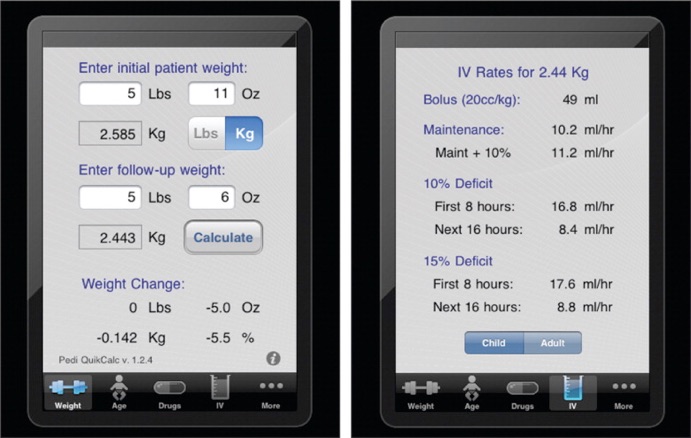
Screen captures from an iPad using the Pedi QuikCalc app.
4. PALS Advisor 2012 Pediatric Advanced Life Support ($1.99). A fellow resident recommended this one, saying “This app is awesome!” She was right. No pediatrician wants to encounter an emergency situation unprepared. The PALS adviser can be used in two ways. First, by identifying an initial loss-of-consciousness scenario, steps of resuscitation can be clicked through by answering “yes” or “no” questions.
Alternatively, algorithms allow you to view resuscitation instructions in their entirety without multiple clicks. The app includes the most recent recommendations for basic life support, as well as neonatal resuscitation guidelines. For the neonatal resuscitation, I prefer the algorithm version instead of having to click through heart rates to get to the next step.
In an emergent situation, one may not have a free hand for clicking. This app will probably be more helpful in an ICU or hospital setting, but at some point, you’ll surely encounter very sick patients in your office. This will allow you to be better prepared when you may be personally overly stressed. Drawback: This is available for the iPhone and iPad only.
5. Pedistat ($2.99). Although somewhat similar to the PALS app in that it focuses mostly on advanced life support, the Pedistat app includes more everyday categories, including normal vital signs, toxicology, equipment, etc. This app is simple, straightforward, and does not require a lot of clicks.
To start, a weight may be entered, but the app will also estimate doses and sizes of equipment if only an age or height is available. For example, after selecting the “equipment” category after entering in an age, Pedistat will give you chest tube sizes, endotracheal tube (ETT) sizes, Foley catheter sizes, laryngoscope blade sizes, and so on. The “fluid resuscitation” category automatically calculates fluid maintenance rates and bolus amounts. The Glasgow Coma Scale portion of the app allows the user to calculate a score based on age appropriate response. Normal vital signs are based on age. This app is not nearly as detailed as the PALS app in regards to instructions for advanced life support, but simplicity is the beauty of this app.
6. BiliCalc ($1.99). Although I had a difficult time downloading this, it is extremely simple and user friendly for determining whether phototherapy is warranted based on the 2004 American Academy of Pediatrics (AAP) recommendations. The infant’s age in hours can be entered along with the child’s bilirubin level. Bilirubin concentrations that require phototherapy are then listed along with corresponding neurotoxicity risk groups (low, medium, and high).
The user can easily view neurotoxicity risk factors to determine which risk group should be used for the specific patient. Information is quickly obtainable and does not require Internet connectivity. Drawback: This app only calculates phototherapy levels for infants born at 35 weeks gestational age and up.
7. Breastfeeding Management 2 ($1.99). Although most of the information on this app is useful for the novice pediatrician or support staff, the calculator section is simple and straightforward. The weight-loss calculator is probably the most useful function, as weights in the office are often recorded in pounds, which makes it difficult to calculate the percent weight loss without a calculator. This app can calculate the percent weight change using either pounds or kilograms.
However, the feeding calculator is another useful component of this app that can be used to reassure new moms. The feeding calculator allows the pediatrician to enter the age of baby in days, number of feedings per day, and whether Mom had a cesarean section. It then calculates an average amount per feeding using data from the World Health Organization (WHO) for comparison. For example, an infant on the third day of life receiving 10 feedings a day after a vaginal delivery, the expected average amount per feeding is 0.8 oz. This is also helpful for moms who are pumping and concerned they are not supplying enough milk.
8. KidsDoc ($1.99). KidsDoc is an app developed by the AAP. KidsDoc is designed to help parents know when they should bring their child in to see the doctor, or when to wait; it also recommends home measures for specific symptoms. Parents can search either by body area affected, alphabetically, or by keyword.
For example, when selecting “diaper rash,” several presentation symptoms are given; the parent can select the ones that best fit their child. From there, the parent can see when to call the doctor, ranging from “now,” “during weekday normal hours,” or it may simply recommend self-care at home. If the parent selects “call the doctor,” a primary care physician can be programmed in and the app will dial the number for them.
Thorough care advice is given for more than 90 complaints. The app also instructs parents which over-the-counter medications they may find useful for their child’s symptoms. The app also lists dosages based on weight for frequently used medication, including, ibuprofen, diphenhydramine, and dextromethorphan, and acetaminophen.
9. Parenting Ages and Stages (free). This is an additional app you can confidently recommend to your patients’ families. Developed by Parenting magazine, this app contains a plethora of information, including articles addressing common questions that parents may have, such as about development, nutrition, sleep, and behavior and discipline. There is a search function in which the user may enter in a key word, for example, “vaccines.” (Which actually leads to a fantastic article identifying and addressing common misinformation about childhood vaccines.)
My favorite feature is the ability to click on the child’s approximate age and be given a choice of articles addressing common concerns by month of life. The content featured in this app will be helpful to most parents. Drawbacks: Aside from being difficult to sort through, another downfall with this app are the advertisements at the bottom of the screen, which constantly pop up and block the text.
10. Visual Dx (free). This app is by far the best dermatology guide I have discovered. This app is technically free for 15 days. After that, the app can be purchased on an annual basis for $49.99, which breaks my rule of $5 or less, but once I downloaded the free subscription, I was hooked.
The app allows one to either build a differential diagnosis, or to select a specific diagnosis using the diagnosis look-up. The differential diagnosis is built based on your selected characteristics of the rash. For example, choosing the age of the patient, you can choose visual findings such as macular and erythematous, or scaly and plaque-like. You then select body location, along with additional information, including timing and the patient’s general appearance.
Once all of the descriptions have been entered, a fairly thorough differential is given for the rash. Clicking on one of these differentials then displays several high-quality pictures, along with descriptions, management, treatment, prognosis, etc. An ICD-9 code is even included.
Drawbacks: This app is extremely thorough and even can be downloaded onto your personal computer, although when I did, the image quality was inferior to my iPad’s. The biggest disadvantage is the subscription cost, but the 15-day trial sold me that the investment was worth it.
AUTHORS
Lindsay B. Blackmon, MD is a second-year pediatrics resident at the University of Kentucky. She was a 2010 Honors Graduate of the University of Kentucky College of Medicine. After residency, she plans to practice General Pediatrics in her hometown of Bardstown, KY.
Dr. Blackmon has disclosed no relevant financial relationships.
The opinions expressed in the “Point of View” are solely those of the author, and do not necessarily reflect those of the staff and management of Pediatric Annals.
doi: 10.3928/00904481-20120426-12



Very Useful Outpatient Pediatric Tool
-
•Posted on March 2, 2013 by Kathleen Aiello, MD in Outpatient
App: Pedi QuikCalc

$1.99 in the AppsStore
Rating: 4/5
Pedi QuikCalc is an excellent tool, widely applicable to day-to-day office pediatrics and in the newborn nursery. It combines calculators with standard charts and allows comparisons of measurements to average values.

In my opinion, the most valuable function is the bili calculator. It saves me the trouble of pulling out my old laminated risk nomograms. You enter the baby's age and bilirubin level, and the app displays the risk zone and plots the bilirubin on the AAP risk or phototherapy nomograms. It can also display the decision-making algorithm.
Other useful newborn nursery tools include an age in hours calculator based on birth date and time, and a percentage weight change calculator based on initial and follow-up weights.
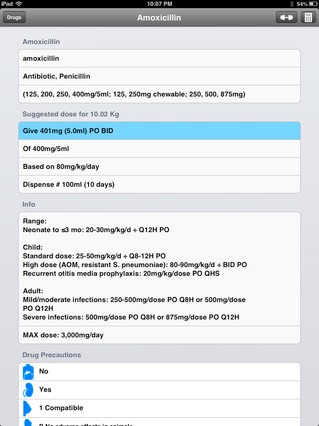
The drug list with suggested dose and the dosage calculator are also very helpful tools. There is a lengthy list of common pediatric drugs with dosing recommendations very similar to those found in 'The Harriet Lane Handbook". The drugs are even broken out by dosing indications (ex: general amoxicillin use versus amoxicillin specifically for Lyme disease.) When you click through to the medication, the suggested dose for a given weight pops up.

The dosage calculator is great for calculating weight-based medications for which you already know the dosing. The default is the weight that was initially entered on opening the app.
The drug list and dosage calculator do a wonderful job simplifying the drug calculation process. There is plenty of information provided so prescribers can change from the suggested dose if clinically appropriate.
There is a handy Web Links section listing sites such as the AAP, HealthyChildren and CDC. The Calculator Links section includes another Bilitool and a link to a Body Surface Area calculator. Although linking to other calculators is a good idea, it is probably unnecessary at this point because of the built-in bili tool and the infrequent need for BSA calculations.
The IV rate calculator is the one function that seems out-of-place, as it is the only clear inpatient-based tool. It suggests recommended maintenance, bolus and fluid replacement rates based on the child's weight. While this is useful information to have in some situations, it is incongruous with the otherwise pediatric outpatient and newborn nursery tools and data.

Pedi QuikCalc works well on both devices. The only negative about the iPhone app is the navigation. It takes an extra click to get to the bili tool, BMI calculator and growth charts.
Suggestions
-
• Include a reference at the bottom of each graph, as well as for the drug dosing. Note that you can find references for all of Pedi QuikCalc if you select the 'i' link at the bottom of the Weight calculator.
-
• Consider grouping the newborn nursery tools together. You have to select and calculate the baby's age in hours on one screen, then navigate to the bili calculator.
-
• Take into account the patient's age when giving a suggested dose on the drug screen. The suggested dose is based on the entered weight, but not the age. For example, I entered weight information for a 1 month old, and the suggested dosing of Amoxicillin was 80 mg/kg/day.
-
• The dosage calculator should give you the choice of entering the weight in pounds or kilograms.
-
• Include height and weight percentages next to the entered values, similarly to how BMI is presented.
Summary
This is a strong application that could save a lot of time in the office or nursery. It allows the user to enter routine data in order to obtain percentages, quickly view standard graphs and charts, and prescribe weight-based medications.